πŸŽ‰ Launch Special: Receipt Vault + is available for $4.99 for a limited time.
No accounts. No bank links. No tracking.

Private receipt tracking without the accounting app complexity.

Receipt Vault + helps you capture, organize, search, and export receipts in seconds β€” without connecting to your bank, credit cards, or bookkeeping software.

Thank you for supporting the launch of Receipt Vault +. Early adopters can purchase the app at the introductory launch price of $4.99.
βœ“ Local-first storage βœ“ Works offline βœ“ One-time app purchase βœ“ Designed for iPhone
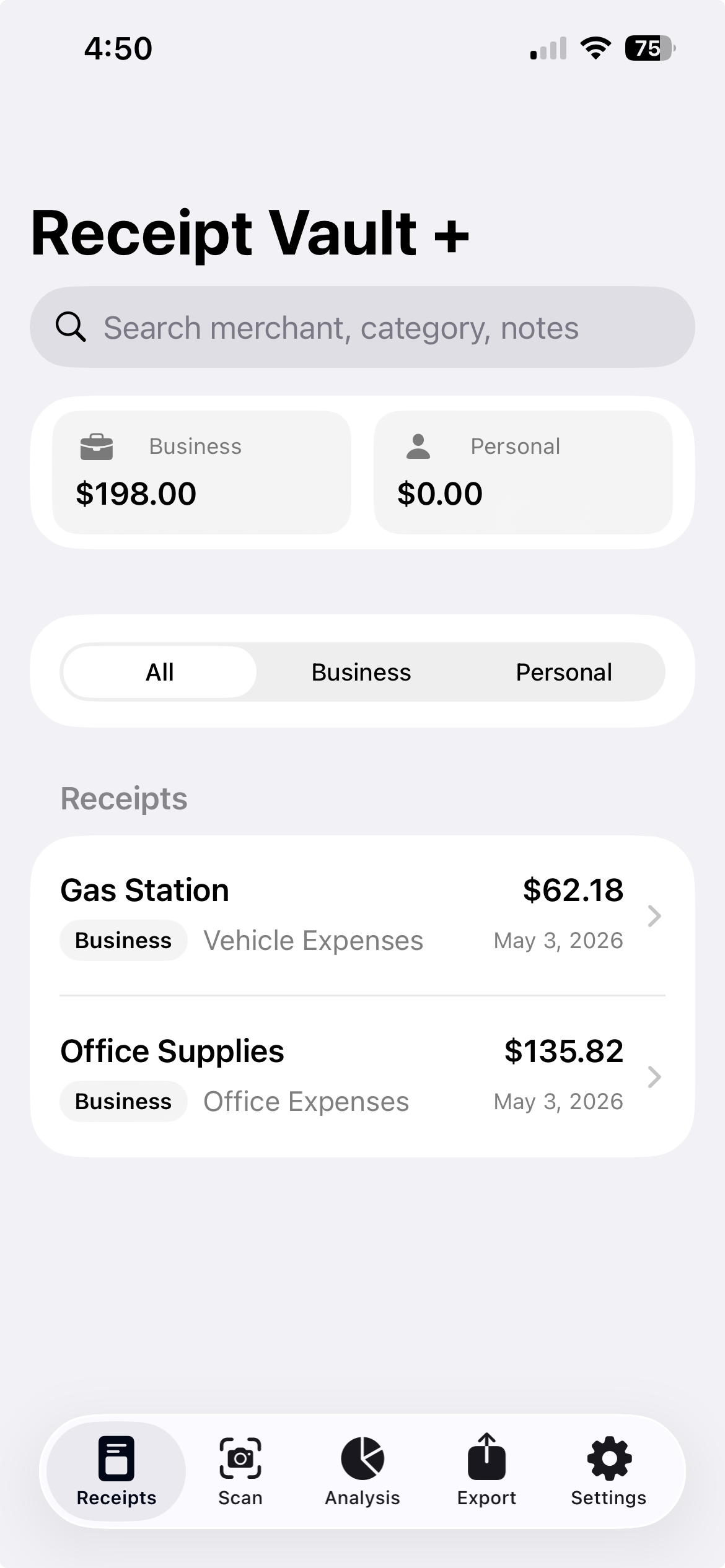
Receipt Vault + app screenshot showing receipt dashboard and receipt records
Tax-ready exportsAccounting-compatible CSV, PDF records, and tax-year summaries.
Private by designSearchable receipts stay on your device.

Never lose an important receipt again.

Built for personal expenses, business purchases, reimbursements, warranties, conferences, and tax preparation.

01

Capture receipts quickly

Photograph or import receipts and keep them organized in one clean archive.

02

Find receipts with #hashtags

Add custom #hashtags to receipts so you can quickly search by trip, client, project, warranty, conference, or tax category.

03

Separate business and personal

Keep household spending apart from professional expenses for cleaner exports and summaries.

04

Avoid duplicate clutter

Flag potential duplicate receipts before they distort your reports or tax-year summaries.

05

Understand your spending

View category breakdowns, business versus personal totals, trends, and receipt summaries.

06

Export accounting-ready records

Create QuickBooks-compatible CSV* exports and polished PDF records for tax season, reimbursement, bookkeeping, or your accountant.

$

One-time purchase. No subscription.

Pay once. No recurring fees. No accounts, ads, or bank connections. Receipt Vault + is designed for people who want a private receipt archive without another monthly subscription.

Demo

Scan, organize, search, and export receipts in seconds.

Receipt Vault + keeps your receipts private, searchable, and tax-ready β€” without accounts, ads, bank connections, or accounting app complexity.

Quick ScanCapture receipts quickly from your phone.
Smart SuggestionsAuto-detect merchant, date, amount, and category.
Hashtag SearchFind receipts using simple tags like #tax2026 or #conference.
Tax-Ready ExportExport clean CSV or PDF summaries for your accountant.
AnalyticsVisualize spending trends, categories, and business versus personal expenses at a glance.
Private by designNo accounts. No ads. No bank connection.

Why Receipt Vault + exists

Many receipt apps are built around bank connections, accounting platforms, subscriptions, accounts, or data collection. Receipt Vault + was designed for people who want something simpler: a fast, private place to store receipt records without handing over financial access.

Simple enough for everyday use

Open the app, save the receipt, add the details, and move on.

Useful when records matter

Find receipts later for returns, warranties, reimbursements, taxes, and business expenses.

Private by default

No ads, no third-party analytics, no bank login, and no unnecessary account layer.

Built around real-life receipt workflows.

Receipt Vault + is not trying to replace your accountant. It is designed to keep the receipts you need from disappearing.

Tax-year summaries

Support your accountant with organized tax-year summaries, CSV exports, and PDF records that make review easier.

Small business expenses

Track supplies, travel, meals, office purchases, and other deductible business costs.

Warranty tracking

Keep proof of purchase for appliances, electronics, tools, and household items.

Travel and conferences

Capture receipts immediately before they end up lost in your bag, inbox, or camera roll.

Reimbursements

Save work-related receipts and export records when someone needs documentation.

Household organization

Keep personal purchases searchable without connecting your private financial accounts.

Your receipts stay yours.

Receipt Vault + does not connect to banking apps, credit cards, accounting platforms, advertising networks, or third-party analytics tools.

No accounts

No sign-in is required to use the app.

No tracking

The app is designed without third-party advertising or tracking.

Local-first storage

Your receipt records are stored locally on your device.

A lighter alternative to accounting software.

Receipt Vault + is designed for simple receipt organization β€” not banking integration, payroll, invoicing, or full bookkeeping.

FeatureReceipt Vault +Typical accounting apps
No account requiredYesOften no
No bank connection requiredYesOften central
Local-first receipt archiveYesVaries
Simple personal and business separationYesOften more complex
#hashtag receipt searchYesVaries
Accounting-compatible CSV exportsYesYes
Tax-year summaries for your accountantYesYes
Full bookkeeping platformNoYes
Subscription requiredNoUsually

Perfect for everyday records and professional expenses.

Use Receipt Vault + when you need receipts organized, searchable, and ready to export.

Small business owners

Track purchases, supplies, travel, and other business expenses.

Freelancers and consultants

Keep client, project, travel, and reimbursement receipts organized.

Professionals

Save conference, CME, licensing, office, and work-related receipts in one place.

Tax preparation

Export organized records for your accountant, bookkeeper, or personal files.

Warranty tracking

Store proof of purchase for electronics, tools, appliances, and household items.

Household organization

Keep personal receipts searchable without connecting financial accounts.

Questions before you download?

Here are the details users usually want to know before trusting an app with receipt records.

Does Receipt Vault + require an account?

No. Receipt Vault + is designed to work without account creation or sign-in.

Does it connect to my bank or credit card?

No. The app does not connect to banks, credit cards, or accounting platforms.

Where is my data stored?

Your receipt records are stored locally on your device.

Can I export my receipts?

Yes. The app is designed to export clean CSV and PDF records for tax season, reimbursement, bookkeeping, or personal archiving.

Is this a full accounting app?

No. Receipt Vault + is a simple receipt organizer. It is best used alongside your accountant, bookkeeping process, or personal records.

Does it work offline?

Yes. The core receipt archive is designed for local-first use on your iPhone.

How do backups work?

Receipt Vault + allows you to create a backup ZIP containing your receipt data and images. Store the ZIP in Files, iCloud Drive, or another secure location to protect your records.

How do I restore a backup?

Use Restore Backup ZIP from Settings to restore a previously created backup. This can help recover receipts when moving to a new device or after accidental data loss.

What export options are available?

Receipt Vault + supports PDF and CSV exports, allowing you to share records with accountants, bookkeepers, employers, or for your own archiving.

What is included in a CSV export?

CSV exports include receipt details such as merchant, amount, date, category, expense type, and tags. CSV files can be opened in spreadsheet software and imported into many bookkeeping workflows.

Support

For questions, feedback, or support, contact:

Email: support@receiptvaultplus.com

Available Now on the App Store

Receipt Vault + is designed as a simple, private receipt organizer for iPhone.

πŸŽ‰ Launch Special: Available for $4.99 for a limited time.

Keep the receipt. Skip the clutter.

Receipt Vault + gives you a private, searchable, export-ready receipt archive without turning simple record keeping into a full accounting project.

About

Receipt Vault + is developed by 2812537 Ontario Limited, a Canadian software company focused on simple, privacy-first productivity applications.

Privacy Policy for Receipt Vault +

Effective Date: May 3, 2026

Receipt Vault + is designed to help users store and manage receipts on their personal device. Your privacy is important to us.

Overview

Receipt Vault + does not require account creation and does not connect to your bank, credit card, accounting software, advertising networks, or third-party analytics platforms.

Information Stored by the App

The app may store information that you enter or capture, including receipt images, merchant names, receipt amounts, dates, notes, tags, and expense categories.

How Information Is Used

This information is used only to help you organize receipts, view summaries, detect potential duplicates, create reports, and export records.

Local Storage

Receipt Vault + currently stores data locally on your device. We do not operate external servers that store or process your receipt data.

Data Sharing

Receipt Vault + does not sell, share, rent, or disclose your receipt information to advertisers, data brokers, financial institutions, or third parties.

Data Deletion

You may delete receipts within the app at any time. If you delete the app, locally stored app data may also be removed from your device.

Children’s Privacy

Receipt Vault + does not knowingly collect personal information from children under 13.

Changes to This Policy

This Privacy Policy may be updated from time to time. Updates will be posted on this page with a revised effective date.

Contact

For questions about this Privacy Policy, contact:
Email: support@receiptvaultplus.com
Developer: 2812537 Ontario Limited